Sayonora
← Back to home — Ferry plans the move to Postgres. Warp runs and governs workloads on Postgres. Ferry tells you how hard moving to Postgres will be; Warp keeps your application running while you do it.
Ferry
Tool for moving off Oracle/MySQL/MariaDB/SQL Server onto Postgres: assess how hard the migration is, launch and track the real data-movement run, and bridge your existing application to Postgres while you do it.
On this page
Two ways to get an assessment#
- Connect a databaseA read-only connection profiles the real schema, feature usage, and query workload directly — no data leaves your database, only metadata and query statistics. Deterministic: run it twice, get the same score.
- Upload a performance reportDrop in an Oracle AWR report, a MySQL performance report, or a SQL Server DMV/Query Store export, and an LLM reads it for you. A genuinely different kind of signal than a live connection — labeled as such everywhere it shows up, never presented as equivalent.
What you get#
- Migration difficulty score and tierReproducible and rules-based — run it twice against the same database, get the same score and the same itemized breakdown behind it.
- Feature inventoryPL/SQL packages, triggers, procedures, partitioning, database links, scheduled jobs, and more, each weighted by real migration cost.
- Schema, workload, and parameter browsingDrill into any table, view, procedure, or function's real definition; a captured-query-workload summary (top SQL by cost, executions, buffer gets); and the source database's full configuration parameter list, filterable — all read-only, all from the same connection.
- Downloadable findings report (PDF)Generated live from the current scan, built for sharing with a stakeholder who'll never open the app.
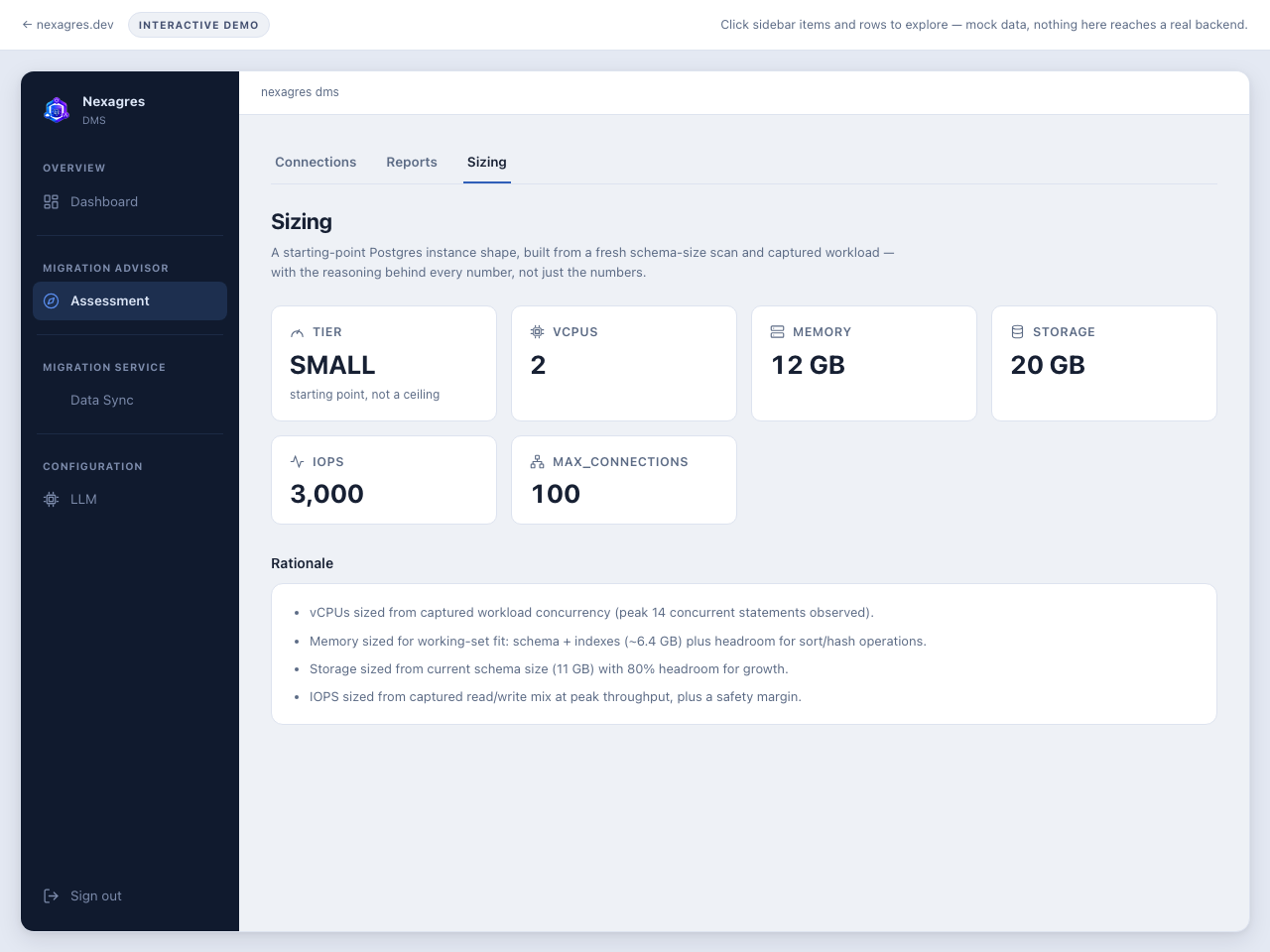
- Postgres sizing recommendationvCPUs, memory, storage, and IOPS from a live connection's schema size and captured workload — or from an uploaded report's signals — with the caveats and the reasoning behind every number spelled out, not just the numbers themselves.
- PL/SQL summarization (Oracle sources)An LLM explains what a package or procedure actually does in plain English, with an optional second-opinion "judge" model for a review pass — advisory only, layered on top of the rules-based score, never replacing it.
Where Ferry is still early: connection credentials are encrypted at rest
(AES-256-GCM) when SAYONORA_ENCRYPTION_KEY is set, or resolved from Vault,
CyberArk, AWS Secrets Manager, Azure Key Vault, or GCP Secret Manager instead of being
stored at all — but that's opt-in, and a bare install without it stores a plain password,
so set it (or use a secret reference) for anything beyond local dev. A second, read-only
admin account and SSO login are both available (Enterprise) — see
Free vs. Enterprise below; a bare-install free/Developer tier
still has just the one shared admin account. Bandwidth/workload throttling, source
production protection, and structured audit logging are also covered there.
Quick start:
docker run -p 8090:8090 \
  -v polyadvisor-data:/data \
  ghcr.io/polygres26/ferry:latest
Connecting, exploring, and reviewing PL/SQL with an LLM's help#
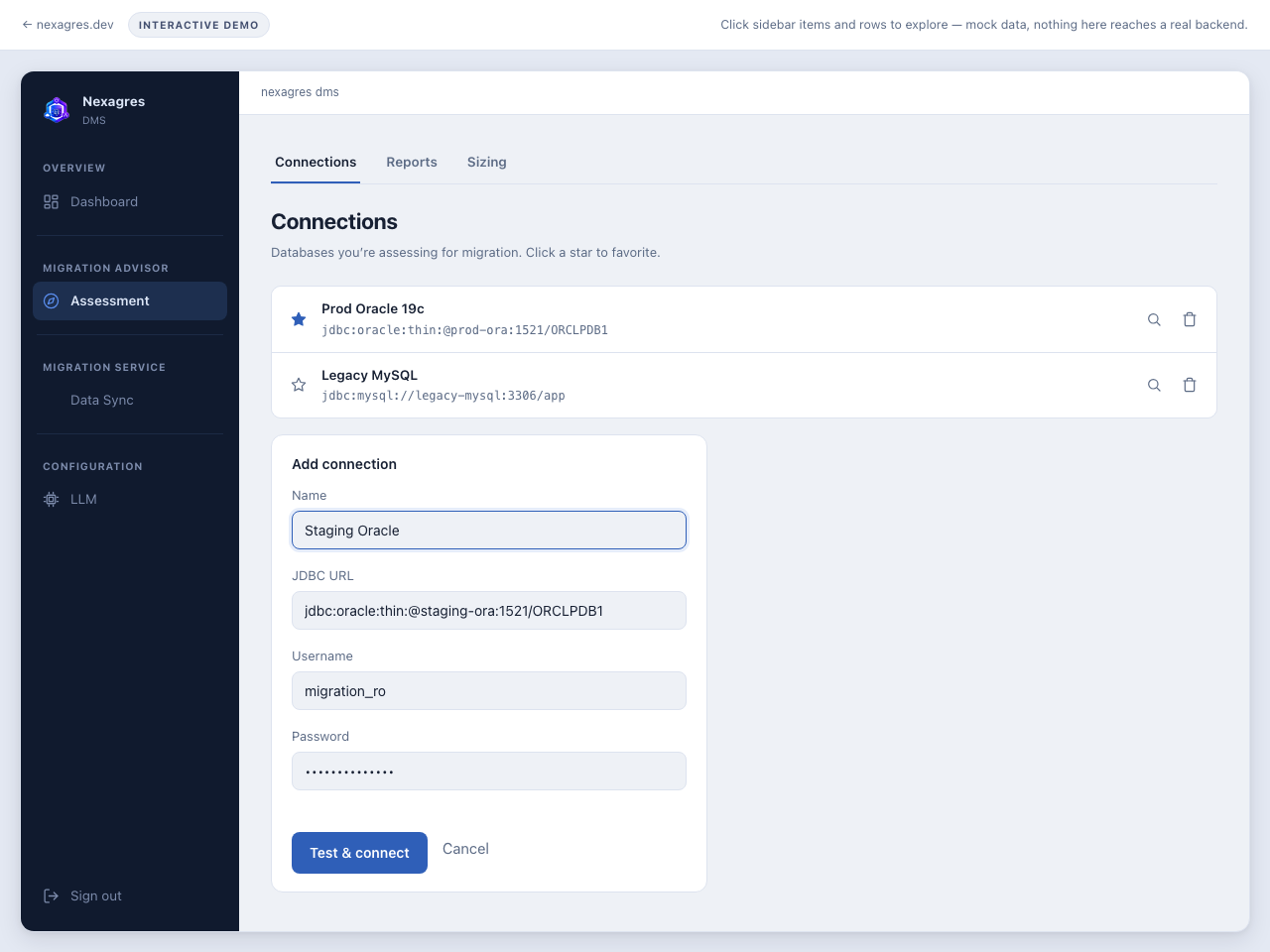
A connection is a JDBC URL, a schema/user, and a credential — plain password today, or a reference into HashiCorp Vault, CyberArk, AWS Secrets Manager, Azure Key Vault, or GCP Secret Manager if you'd rather not store the secret in Ferry at all. Once it's saved, Objects lists everything that user can see, grouped by type and (for a multi-schema connection) owner-qualified so a package in one schema is never confused for one in another. Selecting a routine shows its real source, pulled live from the database, not a cached copy.
What the LLM step actually does, precisely: select a package, procedure, or
function and Ferry can ask an LLM to explain it — a plain-English summary of what
it does, a bullet list of the specific constructs that are non-trivial to port to
Postgres (cursor locking, DBMS_OUTPUT, autonomous transactions, and the
like), and a trivial/moderate/substantial effort estimate with its reasoning. This is a
reviewer's aid, not a code generator — it does not emit PL/pgSQL, and nothing it produces
feeds back into the deterministic score above. Runs entirely local by default (no API
key, nothing leaves the machine) against a small on-box model, or against an external
provider if you configure one on the LLM page.
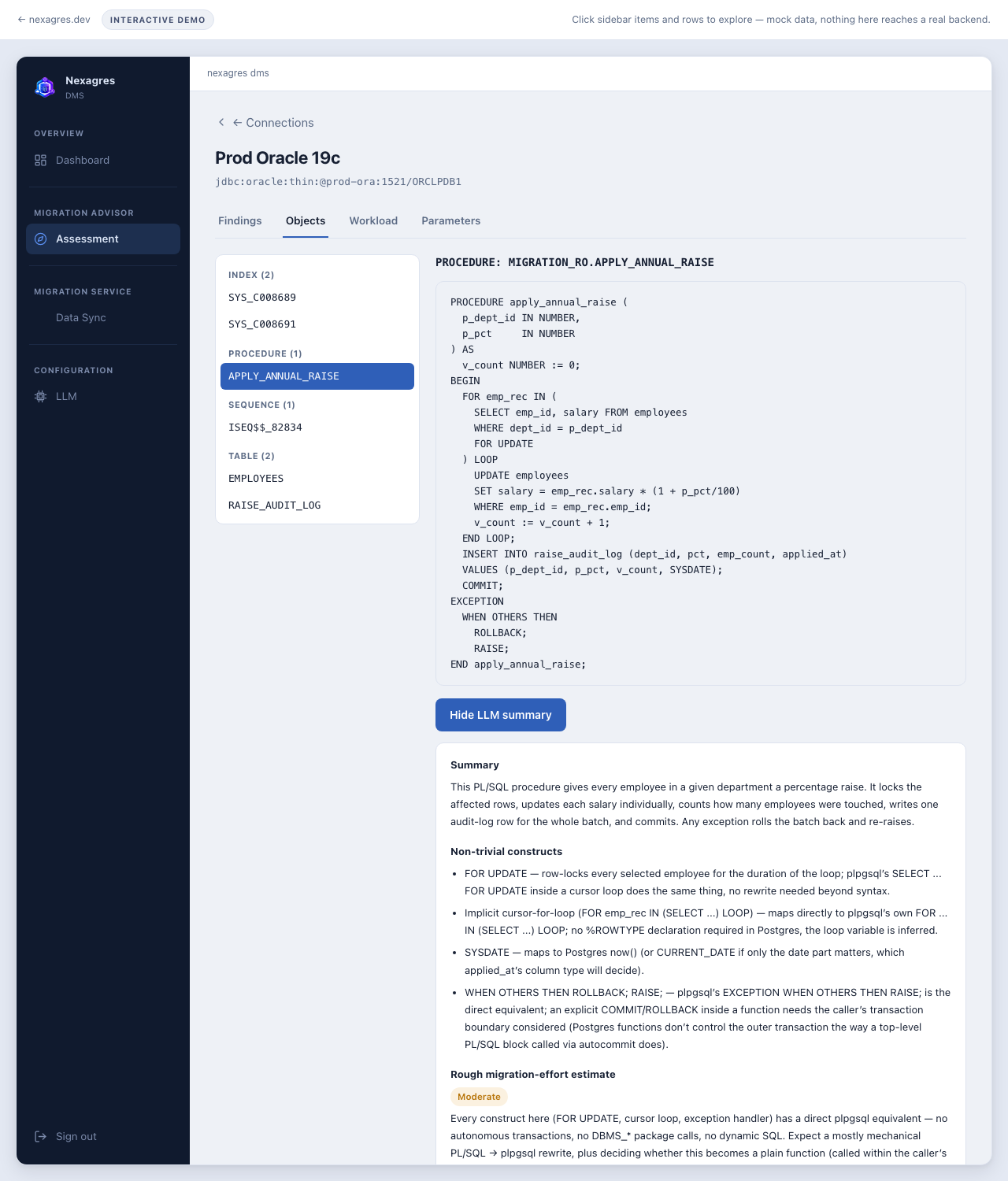
FOR UPDATE loop, DBMS_OUTPUT, exception handling) and the LLM's live output below it — a summary, the specific constructs that need manual attention when porting to Postgres, and an effort estimate. Explanation and risk-flagging, not automated translation.Admin console#
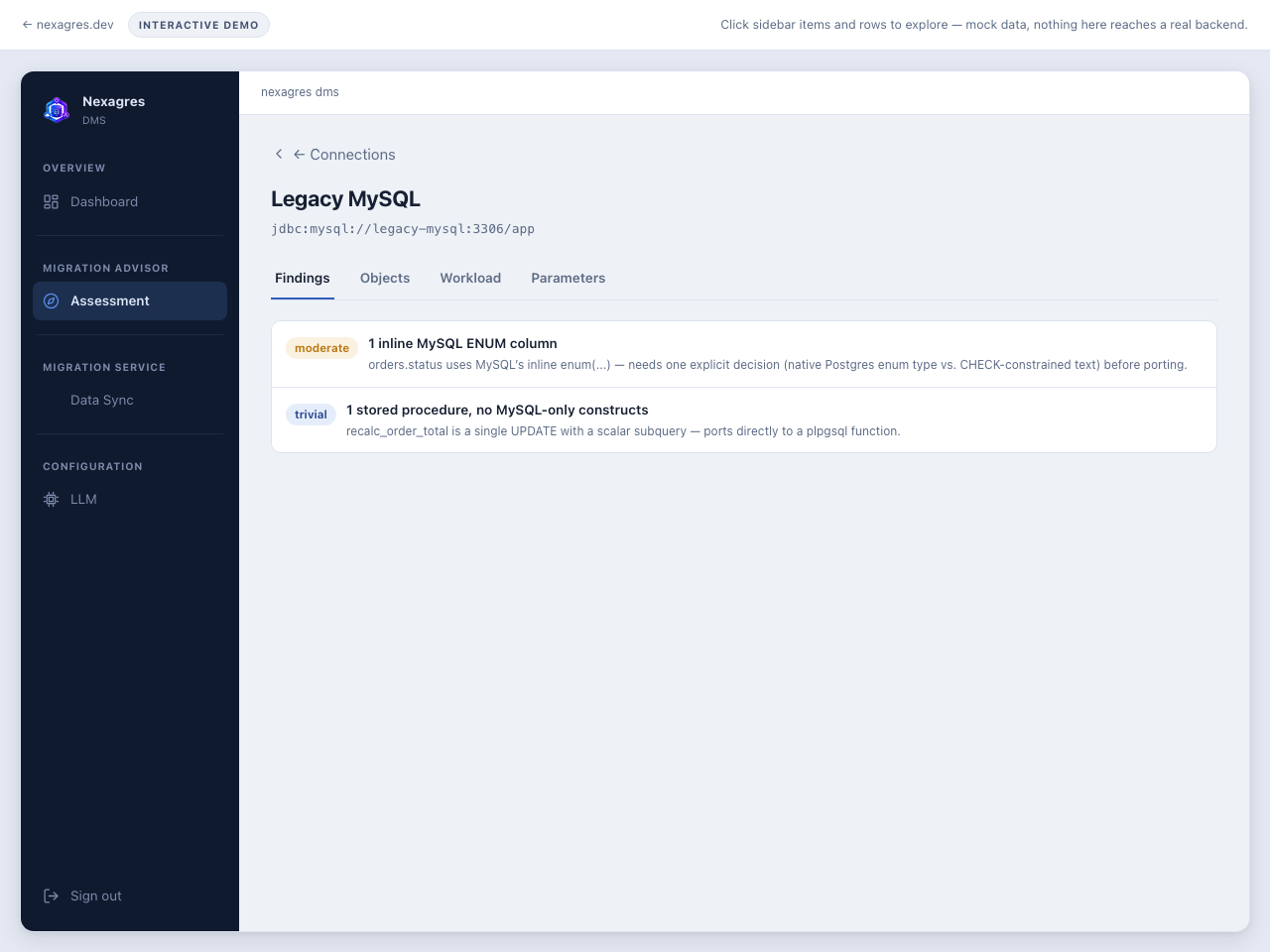
The two screenshots above are the real product against a real connection. The embed below is the click-through demo — synthetic data standing in for a real connection, but the same console, every page explorable, nothing left as a static picture.
Migration Service: launch and track a migration#
Assessment tells you what you're dealing with; Migration Service is where you actually
move the data — real, massively-parallel sayonora-migration runs
(MongoDB change streams, MySQL binlog, SQL Server/Oracle native CDC, DynamoDB Streams,
SQS, Neo4j snapshot, InfluxDB timestamp-cursor tail), launched from a form and tracked to
completion, without ever leaving Ferry. Every write lands through
Warp's own gRPC driver — never a direct JDBC connection to
the target — so a migration in progress is subject to the exact same firewall, QoS, and
cache pipeline as any other client.
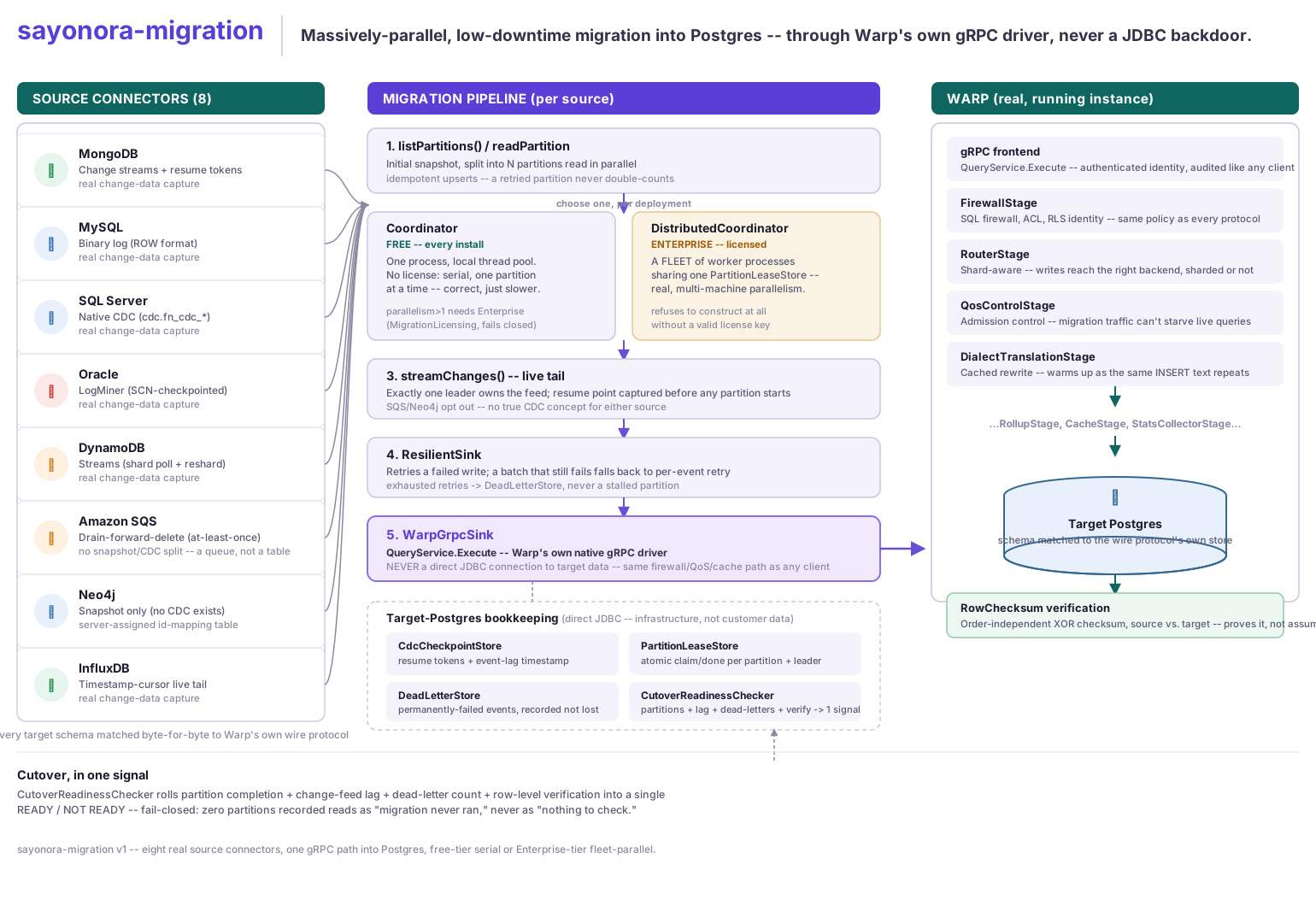
Launch picks a connector, the target Postgres connection, and the source's own credentials, then starts the run server-side. Status shows the same live progress every worker process itself checkpoints against — partitions done, events applied, change-feed lag, and which worker currently owns the live tail — for every source pointed at that target, not just the one you just launched. Parallelism above 1 needs an Enterprise Warp license; without one, a migration still runs correctly, just serially, one partition at a time.
Sources Migration Service accepts#
Every source gets a real, parallel initial snapshot. Where the source has a genuine change-tracking mechanism, Migration Service also runs a live change-data-capture (CDC) tail after the snapshot — not a polling re-scan. Where it doesn't (a queue; a graph database with no CDC in its free tier), that's stated plainly below, not glossed over.
| Source | Initial snapshot | Live CDC | Mechanism |
|---|---|---|---|
| MongoDB | ✓ parallel | ✓ | Change streams + resume tokens |
| MySQL | ✓ parallel | ✓ | Binary log, ROW format |
| SQL Server | ✓ parallel | ✓ | Native CDC (cdc.fn_cdc_get_all_changes_*) |
| Oracle | ✓ parallel | ✓ | LogMiner, SCN-checkpointed |
| DynamoDB | ✓ parallel scan | ✓ | DynamoDB Streams, shard-polled |
| Amazon SQS | n/a — a queue | n/a | Drain-forward-delete, at-least-once (matches SQS's own guarantee) |
| Neo4j | ✓ parallel | — | Snapshot only — Neo4j has no CDC outside Enterprise edition |
| InfluxDB | ✓ parallel | ✓ | Timestamp-cursor live tail |
Every target schema is matched byte-for-byte to Warp's own wire protocol store, so a real client speaking that protocol can use the migrated data immediately.
Pricing#
Assessment — connect, score, size, browse, report — is unrestricted on every tier. What's
paid is the parts of actually moving the data that scale past a single-process,
single-migration setup: real parallelism, unattended cutover, and multi-tenant capacity.
Same WARP_LICENSE_KEY as Warp — one key, one thing to buy.
Developer
$0 / forever
For evaluation, a real migration test, and one-migration-at-a-time production use.
- Full assessment: compatibility analysis, feature inventory, Postgres sizing
- Real data migration — snapshot + live CDC, every source connector
- Automatic resume/checkpointing, data validation, progress monitoring
- Encryption at rest, Vault/CyberArk secrets — opt-in, unrestricted
- Source protection — a fixed default throughput cap, always on
- Serial migration — one partition/table read at a time
- One migration job running at a time
- A failed row stops the run — no retry or dead-letter queue
- No packaged cutover-readiness verdict or automatic cutover
- Single shared admin account — no RBAC, audit log, or SSO
- Community support
Enterprise
$7,500 / year, starting
Per migration environment. For production migrations run at real scale.
- Everything in Developer, unrestricted
- Parallel snapshot/partition workers, single process
- A distributed worker fleet — real, multi-process parallelism
- Failed-row retry with dead-letter queue
- Cutover-readiness verdict, plus automatic cutover the instant it's ready
- Configurable throughput cap, tuned to your source, not just the default
- Concurrent migration orchestration
- Audit log, a second read-only account, SSO bearer-token login
- Enterprise support
Full row-by-row capability breakdown, including exactly which real license check backs each row: Ferry capability table →
Free vs. Enterprise#
Assessment (the whole first half of this page — connect, score, size, browse, report) is
unrestricted on every tier. What's paid is the parts of actually MOVING the data that scale
past a single-process, single-migration setup: real parallelism, unattended operation, and
multi-tenant capacity. Reuses the same WARP_LICENSE_KEY as Warp itself
— one key, one thing to buy.
| Capability | Developer / Free | Enterprise |
|---|---|---|
| Migration assessment | ✓ | ✓ |
| Compatibility analysis | ✓ | ✓ |
| Target Postgres sizing | ✓ | ✓ |
| Schema conversion | ✓ | ✓ |
| Data migration | ✓ | ✓ |
| Single-stream snapshot | ✓ | ✓ |
| Parallel snapshot workers † | — | ✓ |
| Parallel table/partition migration † | — | ✓ |
| CDC (live change-feed tail) | ✓ | ✓ |
| Automatic resume/checkpointing | ✓ | ✓ |
| Failed-row retry / DLQ † | — | ✓ |
| Data validation / reconciliation | ✓ | ✓ |
| Cutover-readiness check † | — | ✓ |
| Automatic cutover at the right time † | — | ✓ |
| Migration progress monitoring | ✓ | ✓ |
| Bandwidth / workload throttling † | Fixed default | Configurable |
| Source production protection † | ✓ (fixed default cap) | ✓ (tunable) |
| Multiple migrations concurrently † | 1 | Concurrent orchestration |
| HA migration workers † | — | ✓ |
| Encryption / enterprise secrets | ✓ (opt-in) | ✓ (opt-in) |
| Audit logging † | — | ✓ |
| RBAC (second, read-only account) † | — | ✓ |
| SSO (bearer-token login) † | — | ✓ |
| Support | Community | Enterprise |
† enforced today by a real license gate in sayonora-migration or
Ferry itself — not a marketing line, a check that actually throws,
clamps, or degrades when it's not licensed. Bandwidth throttling and source protection are
the same mechanism (a token-bucket rate limiter on the write path, which backpressures the
read side too): free tier always runs at a fixed default cap that protects the source
without needing to be tuned; Enterprise can raise, lower, or effectively disable it.
Encryption at rest (AES-256-GCM) and every secret-reference source (Vault, CyberArk, AWS
Secrets Manager, Azure Key Vault, GCP Secret Manager) are real and unrestricted on every
tier — opt-in via SAYONORA_ENCRYPTION_KEY or a secret reference, not something
a license key changes. Audit logging, the second read-only account, and SSO bearer-token
login are genuinely new capabilities, Enterprise-only, and inert (not merely hidden) on the
free/Developer tier. Everything else runs identically regardless of license — CDC,
validation, progress monitoring, and resumable checkpointing all work the same way whether
or not a WARP_LICENSE_KEY is set.